Typesafe RPCs
A Skir service is a typesafe HTTP API: a server and a client communicate using shared Skir data types. Your schema defines each method’s signature (request type and response type), and both the server code and the client code refer to those same schema-defined signatures—so you get a compile-time guarantee that both sides agree on the contract.
Skir services work equally well for communication between microservices, or between a frontend (browser/mobile app) and a backend. The protocol is lightweight and easy to integrate: you can attach a Skir service handler to almost any HTTP server framework.
Core concepts
Building a Skir service involves three main steps: defining the API schema, implementing the server logic, and calling the service.
API definition
Everything starts in your .skir schema. You define methods using the method keyword.
// calculator.skir

method Square(float32): float32 = 1001;
method SquareRoot(float32): float32 = 1002;
A method definition specifies the request type (input), the response type (output), and a stable numeric identifier.
Methods are defined globally in your schema. Skir does not group methods into service blocks in the .skir file like Protocol Buffer does. You decide how to group and implement methods in your application code.
Implement the service
The Skir runtime library provides a Service class that handles all the heavy lifting: deserializing requests, routing to your code, serializing responses.
Note
The examples below use Python, but the concepts apply identically to all supported languages.
Registering methods
You simply link the abstract method definitions from your schema to your Python functions (method implementations) using add_method.
from skirout.calc import Square, SquareRoot
import math

async def square_impl(val: float, meta: RequestMeta) -> float:
    return val * val

async def sqrt_impl(val: float, meta: RequestMeta) -> float:
    if val < 0:
        raise ValueError("Cannot calculate square root of negative number")
    return math.sqrt(val)

service = skir.ServiceAsync[RequestMeta]
service.add_method(Square, square_impl)
service.add_method(SquareRoot, sqrt_impl)
Request context
RequestMeta is a custom type you define to pass context (like auth tokens or user IDs) from the HTTP layer into your method logic. This context object is passed to every method implementation.
If you do not need to extract any context from the request, you can simply define an empty class.
from dataclasses import dataclass
import skir

@dataclass
class RequestMeta:
    auth_token: str
    client_ip: str


# Create an async service typed with our metadata class
service = skir.ServiceAsync[RequestMeta]
Running the service
Skir does not start its own HTTP server. Instead, it provides a handle_request method that you call from your existing framework's request handler (FastAPI, Flask, Express, etc.).
This allows you to leverage your framework's existing middleware for logging, auth, and rate limiting.
from fastapi import FastAPI, Request
from fastapi.responses import Response
from .my_skir_service import service, RequestMeta

app = FastAPI()


# Mount the Skir service into this FastAPI app
@app.api_route("/myapi", methods=["GET", "POST"])
async def myapi(request: Request):
    # 1. Read body
    if request.method == "POST":
        req_body = (await request.body()).decode("utf-8")
    else:
        req_body = urllib.parse.unquote(
            request.url.query.encode("utf-8").decode("utf-8")
        )

    # 2. Build metadata from framework-specific request object
    req_meta = extract_meta_from_request(request)

    # 3. Delegate to Skir
    raw_response = await service.handle_request(req_body, req_meta)

    # 4. Map back to framework response
    return Response(
        content=raw_response.data,
        status_code=raw_response.status_code,
        media_type=raw_response.content_type,
    )


def extract_meta_from_request(request: Request) -> RequestMeta:
    ...
Call the service
Here is how you call a Skir service directly from your application code.
The Skir runtime library provides a ServiceClient class. You point it at your server URL, and use it to invoke your generated API methods.
from skir import ServiceClient
import aiohttp
from skirout.calc import Square

# Initialize the client with your service URL
client = ServiceClient("http://localhost:8000/api")

async def main():
    async with aiohttp.ClientSession() as session:
        # Call methods directly using the generated definitions
        response = await client.invoke_remote_async(
            session,
            Square,
            5.0,
            headers={"Authorization": "Bearer token"}
        )

        print(response) # 25.0
Code examples
| Language | Server side | Client side |
|---|---|---|
| TypeScript | Express | Client |
| Python | Flask, FastAPI, Litestar | Client |
| C++ | cpp-httplib | Client |
| Java | Spring Boot | Client |
| Kotlin | Ktor | Client |
| Dart | Shelf | Client |
| Rust | Axum | Client |
Why use Skir services?
In a traditional REST API, the contract between client and server is implicit and fragile. If the server changes an endpoint but the client isn't updated, things break at runtime.
Skir enforces this contract at compile time. Both your server implementation and your client calls are generated from the same source of truth. You cannot call a method that doesn't exist or pass wrong arguments without the compiler alerting you.
Versus traditional REST APIs
| Feature | Traditional API (REST) | Skir Service (RPC) |
|---|---|---|
| Endpoint | Resource-based (e.g. /users/123) | Single URL (e.g. /api) |
| Operations | Endpoint + HTTP verb (e.g. GET /users/123) | Methods defined in the .skir file (e.g. GetUser) |
| Input | Path params, query params, JSON body | Strongly-typed request |
| Output | JSON with implicit structure | Strongly-typed response |
| Client | Manual fetch/axios calls | Typesafe, handles serialization and transport |
Note
Skir solves the same problem as tRPC, but it is language-agnostic. While tRPC is excellent for full-stack TypeScript applications, Skir brings that same level of developer experience and safety to polyglot environments (e.g., a TypeScript frontend talking to a Kotlin or Python backend).
Tooling
RPC Studio
Every Skir service comes with a built-in interactive documentation and testing tool called RPC Studio.
To access it, simply visit your API endpoint in a browser with the ?studio query parameter (e.g., http://localhost:8000/api?studio). Skir serves a lightweight HTML page that inspects your service, lists all available methods, and allows you to quickly send requests and view responses.
You can try out a demo:
npx skir-studio-demoTip
If you are familiar with Swagger UI (common in the FastAPI ecosystem), RPC Studio fills the same role. It provides a dedicated, auto-generated web interface to explore your API schema and execute requests interactively.
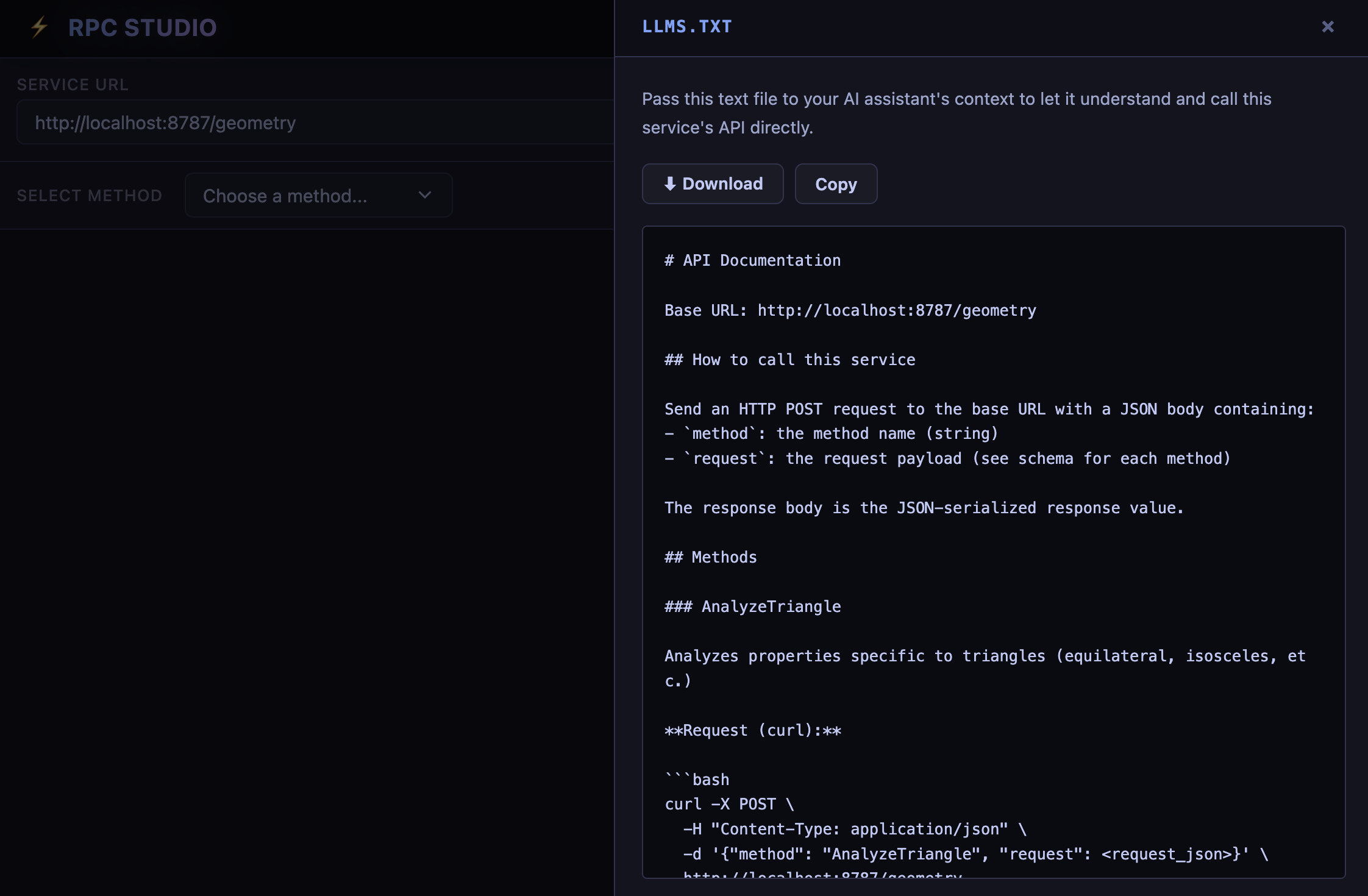
RPC Studio also lets you download a lightweight instruction file that you can pass to an AI agent. It teaches the agent how to call your API, what each method does, and the input/output schema for each method.
Sending requests with cURL
Since Skir runs over standard HTTP, you can also inspect or call it manually. Requests are just POSTs with a JSON body specifying the method name and arguments.
curl -X POST \
  -H "Content-Type: application/json" \
  -d '{"method": "Square", "request": 5.0}' \
  http://localhost:8000/api