Schema evolution & compatibility
Skir includes built-in compatibility checks so you can evolve schemas safely and catch breaking changes before they hit production. It is designed for long-term data persistence and distributed systems, with support for both backward compatibility (new code can read old data) and forward compatibility (old code can read new data when services or clients run different versions).
Safe schema changes
The following changes are safe and preserve both backward and forward compatibility:
Adding a field to a struct
New code reading old data will use default values for missing fields:
- Numbers:
0 - Booleans:
false - Strings, bytes, arrays: empty
- Structs: a struct with all fields at their default values
- Enums: the implicit
unknownvariant - Optional:
null
Adding a variant to an enum
Old code encountering a new variant will treat it as the implicit unknown variant.
Renaming a type, field, or variant
Skir uses numeric identifiers (field numbers) in its binary and compact JSON formats, not names. Therefore, renaming any element is safe. Renaming .skir files or moving symbols across files is also always safe.
Note
Names are used in the human-readable JSON format. This format is for debugging only and should not be used for storage or inter-service communication.
Removing a field or variant
You must mark the field or variant number as removed. This is permanent: once a number is marked as removed, it cannot be reused. When removing a variant, new code encoutering the old variant will treat it as unknown.
Making a compatible type change
You can change a type if the new type is backward-compatible with the old one:
bool→int32,int64,hash64int32→int64float32→float64float64→float32(precision loss possible)[A]→[B](ifA→Bis valid)A?→B?(ifA→Bis valid)
Turning an array into a keyed array
You can freely add, remove, or change the key field of a keyed array (the part after |). For example, changing [User] to [User|id] or [User|id] to [User] is safe. The key annotation is purely a hint for code generation to provide efficient lookup methods—it doesn't affect the serialization format or data compatibility.
Converting a constant variant into a wrapper variant
You can safely convert a constant variant into a wrapper variant. New code reading old data with constant variants will treat them as wrapper variants around empty values.
// BEFORE
enum Status {
  error;
  ok;
}
// AFTER
enum Status {
  // When deserializing old data, the string will be empty.
  error: string;
  ok;
}
Giving a stable identifier to a record
Giving a stable identifier to a record, for example struct Foo(123) {...}, is safe. Stable identifiers are not used during serialization; they are only used by the snapshot tool to track records across time.
Unsafe changes
The following changes will break compatibility:
- Changing a field/variant number, or reordering fields/variants if using implicit numbering.
- Changing the type of a field, wrapper variant, method request or method response to an incompatible type.
- Changing a method's stable identifier.
- Reusing a
removedfield or variant number. - Deleting a field or variant without marking it as
removed. - Converting a wrapper variant into a constant variant.
Automated compatibility checks
The Skir compiler includes a snapshot tool to prevent accidental breaking changes.
How it works
The npx skir snapshot command helps you manage schema evolution by maintaining a history of your schema state. When you run this command, two things happen:
- Verification: Skir checks for a
skir-snapshot.jsonfile. If it exists, it compares your current.skirfiles against it. If breaking changes are detected, the command reports them and exits. - Update: If no breaking changes are found (or if no snapshot exists), Skir creates or updates the
skir-snapshot.jsonfile to reflect the current schema.
Tracked types and stable identifiers
To track compatibility across renames, Skir needs a way to identify your types. You can explicitly assign a random integer ID to your top-level types:
// Explicitly tracked by ID 500996846
struct User(500996846) {
  name: string;
  pets: [Pet];
}

// Implicitly tracked through User, no need to assign an ID
struct Pet {
  name: string;
}
If you rename User to Account but keep the ID 500996846, Skir knows it's the same type and will validate the change safely.
Which types to explicitly track
In most projects, only a handful of types need explicit stable identifiers: the top-level records that you store on disk. All records they contain, directly or indirectly, are implicitly tracked through their parents.
In the example above, Pet is implicitly tracked through User. If you rename Pet to Animal without changing its structure, Skir will still recognize it as the same type because it is the type of the first field (number 0) of User. But if you then make the following change:
struct Animal {
  name: bool;  // Was string
}
The snapshot tool will report a breaking change in Pet/Animal because string → bool is an incompatible type change.
Types used as service method requests and responses are also implicitly tracked through the method number, so you do not need to give them stable IDs.
method GetUser(GetUserRequest): GetUserResponse = 12345;

// Tracked through GetUser
struct GetUserRequest { }

// Tracked through GetUser
struct GetUserResponse { }
Handling intentional breaking changes
If you must make a breaking change (e.g., during early development), simply delete the skir-snapshot.json file and run npx skir snapshot again to establish a new baseline.
Recommended workflow
1. During development
While drafting a new schema version, use the --dry-run flag to check for backward compatibility without updating the snapshot:
npx skir snapshot --dry-runThis confirms that your changes are safe relative to the last release (snapshot).
If you are using the official VSCode extension, breaking changes will be highlighted directly in your editor as you type.
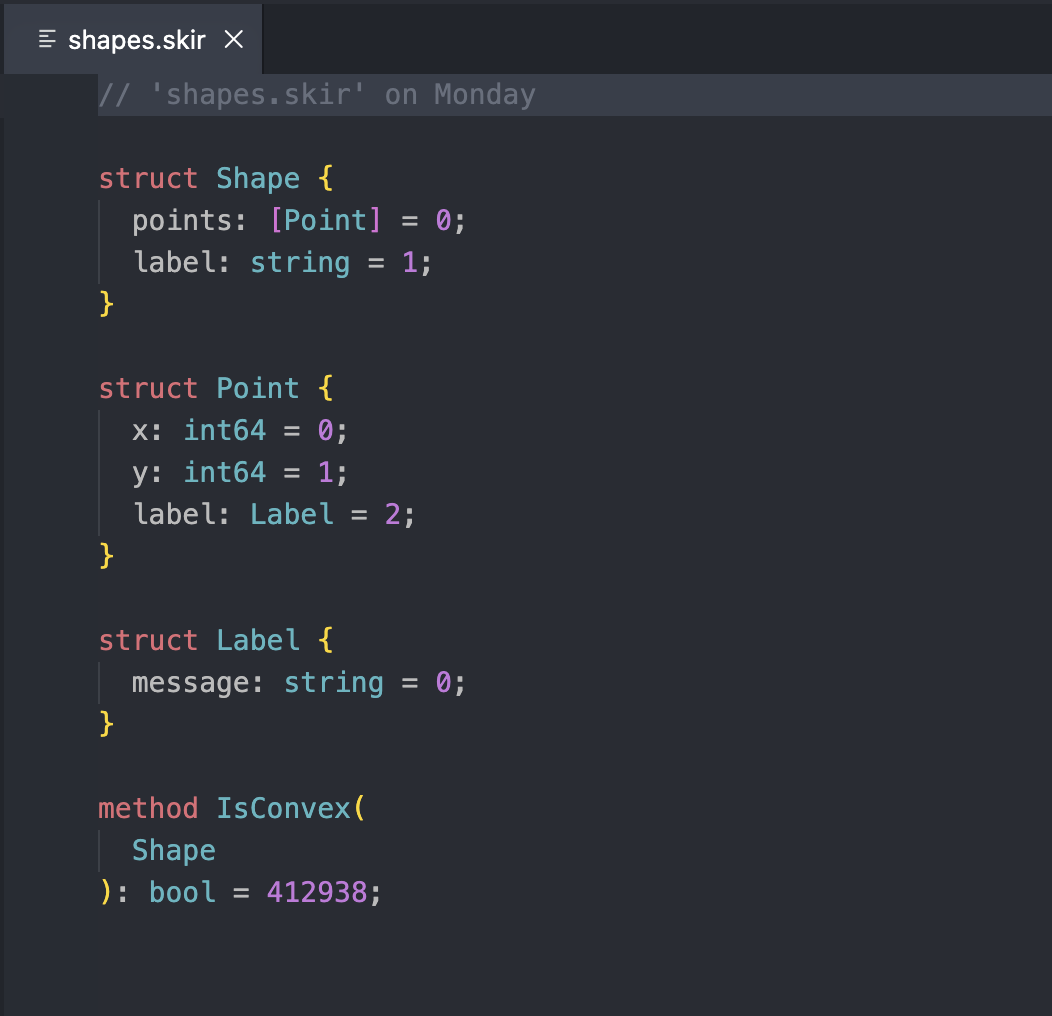
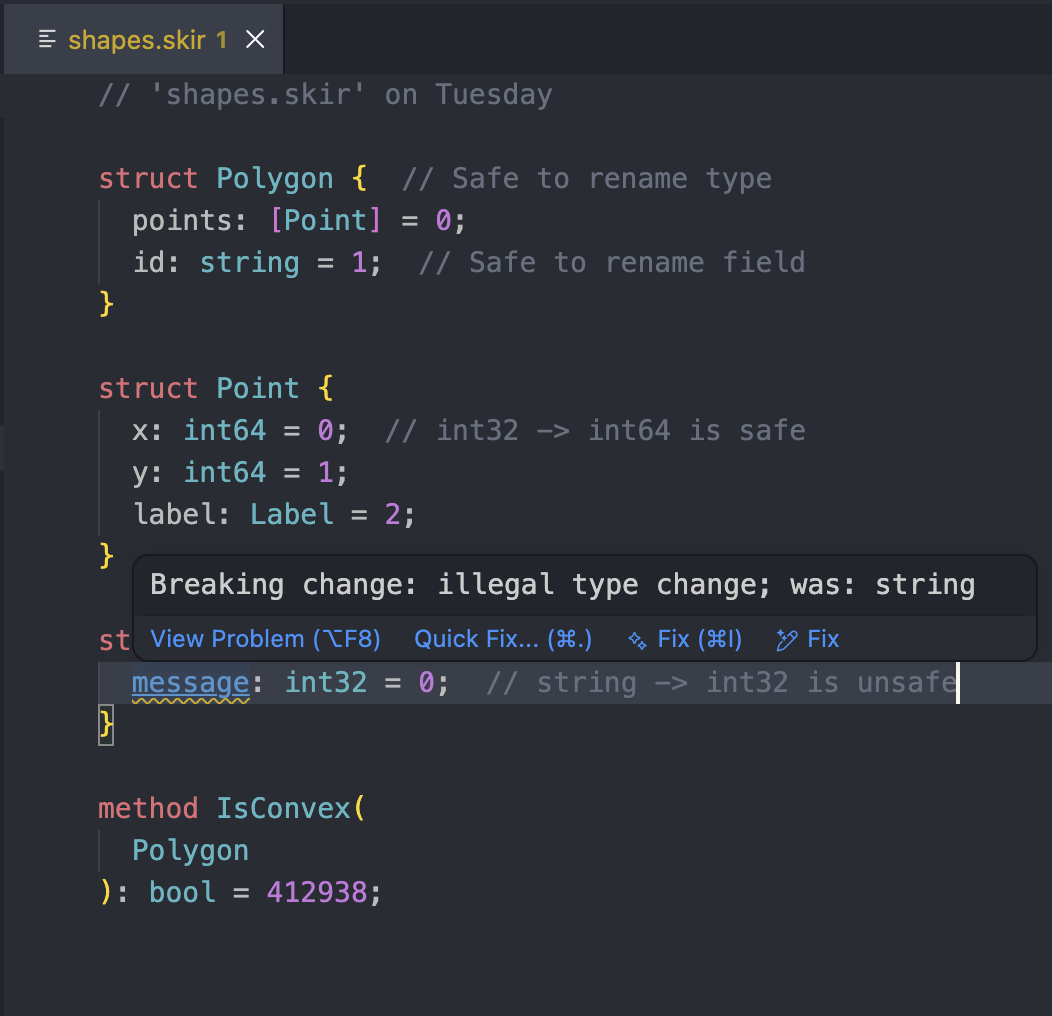
2. Before release
Run npx skir snapshot without flags to verify compatibility and commit the new schema state to the snapshot file.
3. Continuous integration
Add the command to your CI pipeline or pre-commit hook to prevent accidental breaking changes. The --ci flag ensures the snapshot is up-to-date and compatible:
- name: Ensure Skir snapshot up-to-date
  run: npx skir snapshot --ci
Round-tripping unrecognized data
Consider a service in a distributed system that reads a Skir value, modifies it, and writes it back. If the schema has evolved (e.g., new fields were added) but the service is running older code, it may encounter data it doesn't recognize.
When deserializing, you can choose to either drop or preserve this unrecognized data.
- Drop (default): Unrecognized fields and variants are discarded. This is safer but results in data loss if the object is saved back to storage.
- Preserve: Unrecognized data is kept internally and written back during serialization. This enables "round-tripping".
For example, consider a schema evolution where a field and an enum variant are added:
struct UserBefore(999) {
  id: int64;
  subscription_status: enum {
    free;
    premium;
  };
}struct UserAfter(999) {
id: int64;
subscription_status: enum {
free;
premium;
trial; // Added
};
name: string; // Added
}Default behavior: drop
By default, unrecognized data is lost during the round-trip.
// Old code reads and writes the data
const oldUser = UserBefore.serializer.fromJson(originalJson);
const roundTrippedJson = UserBefore.serializer.toJson(oldUser);

// New code reads the result
const result = UserAfter.serializer.fromJson(roundTrippedJson);

assert(result.id === 123);
assert(result.name === "");  // Lost: reset to default
assert(result.subscriptionStatus.union.kind === "unknown");  // Lost: became unknown
Preserve behavior
You can configure the deserializer to keep unrecognized values.
// Old code reads with "keep-unrecognized-values"
const oldUser = UserBefore.serializer.fromJson(
  originalJson,
  "keep-unrecognized-values"
);
const roundTrippedJson = UserBefore.serializer.toJson(oldUser);

// New code reads the result
const result = UserAfter.serializer.fromJson(roundTrippedJson);

assert(result.id === 123);
assert(result.name === "Jane");  // Preserved!
assert(result.subscriptionStatus.union.kind === "trial");  // Preserved!
Warning
Only preserve unrecognized data from trusted sources. Malicious actors could inject fields with IDs that you haven't defined yet. If you preserve this data and later define those IDs in a future version of your schema, the injected data could be deserialized as valid fields, potentially leading to security vulnerabilities or data corruption.